SolidConnect

Context Menu

When you right-click on any item in the import structure or in the products/documents tables a context menu pops up that allows you to do a few actions related to the selected item.
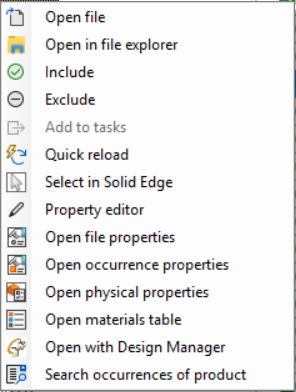
image-20260708-080459.png

When you right-click on any item in the import structure or in the products/documents tables a context menu pops up that allows you to do a few actions related to the selected item.

  • image-20260708-080619.png Open file: opens selected file or the primary associated file of the item in the appropriate program

  • image-20260708-080634.png Open in file explorer: opens selected file or the primary associated file of the item in a new file explorer window with the file selected

  • image-20260708-080651.png / image-20260708-080710.png Include/Exclude: Manually includes/excludes an occurrence of a product when selected in the import structure; includes/excludes all occurrences of a product when selected in the product list. includes/excludes a specific file when selected in the document list. Also note that if all occurrences of a product are excluded, the product itself is automatically excluded. All documents of a product are also excluded when the product is excluded.

  • image-20260708-080744.png Open with Design Manager: opens selected file or the primary associated file of the item in the Design Manager

  • image-20260708-080550.png Property Editor : open the selected file or the primary associated file of the item in the Property editor

  • image-20260708-080836.png Add to tasks: add the selected file or all of the associated files of the item to the tasks table in the Tasks Tab

  • image-20260708-082932.png Search occurrences of products: Highlights all occurrences of the selected document in the occurrence treeview

    image-20260708-083119.png


The following options are only available when you have loaded from Solid Edge:

  • image-20260708-080918.png Quick reload: reload/update file properties and variables of a single selected part

  • image-20260708-081109.png Select in Solid Edge: Select the part(s) in Solid Edge.

  • image-20260708-081048.png Open File Properties: opens the file properties window in Solid Edge of the selected part/document.

  • image-20260708-080950.png Open Occurrence Properties: opens the occurrence properties window in Solid Edge of the selected part/document.

  • image-20260708-081011.png Open Physical Properties: opens the physical properties window in Solid Edge of the selected part/document.

  • image-20260708-081030.png Open Material List: opens the material list window in Solid Edge of the selected part/document.