Suggestions
Sometimes people make spelling errors, and that's alright. But wouldn’t you wish that you could easily replace misspellings like in Word?
Suggestions is here to act as helper to easily improve your data in multiple ways:
-
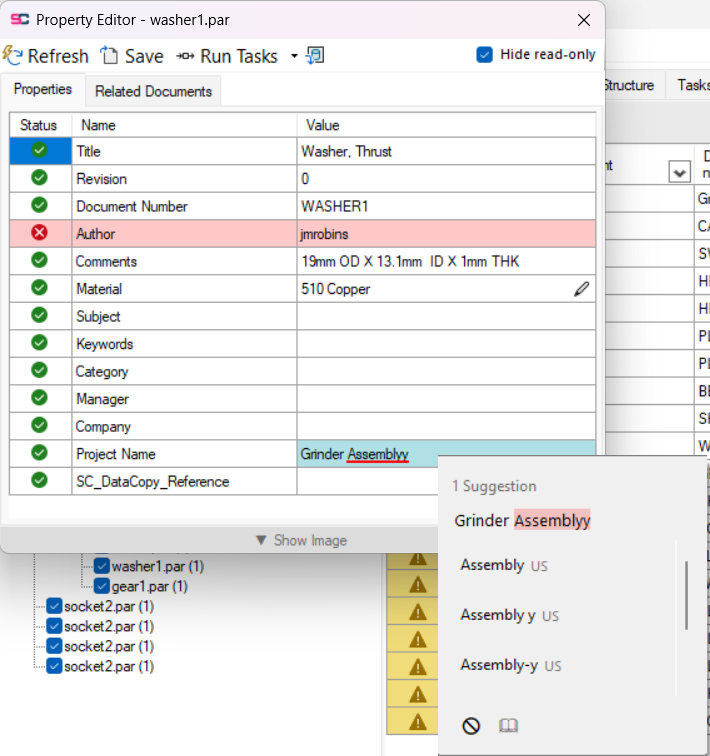
As a spell checker, it marks spellings errors blue and shows correct spellings
-
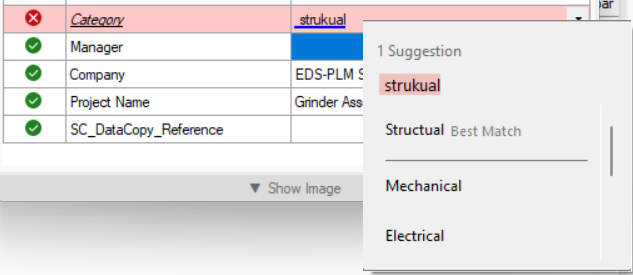
When using List of Values rules, easily choose the correct option
Suggestions are currently only available in the Property Editor
Usage
When you open the Property Editor, some cells will show blue or red underlines, to open the Suggestions you right-click that cell. Then you will see a popup with the value of the cell, with specific words highlighted
-
Red highlight on the word indicate the currently selected word.
-
Yellow highlight indicate other misspelled words.
There can be multiple suggestions in one cell, then you can step trough them with the arrows on the top right.
At the bottom of the popup you can ignore that word or add that word to the dictionary.
List of Value
If you have an List of Values Analyze Rule configured, Suggestions takes that into consideration and will give you the Best Match for a given property.